
Items overview
Every item in the game belongs to a category, and each category has a clear job: evolving, healing, training, teaching moves, catching, or granting status. This page is the high-level map. For exact numbers, follow the links to the detail pages and to the full catalog.
The categories
| Category | What it does | Where to dig deeper |
|---|---|---|
| Evolution stones | Consumed to evolve a species that requires a stone. One stone per element. | Catalog · Evolution |
| Candies | Instant exp. Each is worth a slice of the level of whoever eats it: Exp Candy S/M/L and Rare Candy. | Catalog |
| Vitamins | +10 EV in one stat. The game's only EV source. | Held, gems & healing · Stats |
| Potions | Heal a % of max HP, used automatically during the hunt. | Held, gems & healing |
| Revives | Bring a fainted lead back. Max Revive also cuts the penalty. | Held, gems & healing |
| Catalysts | Essence of Life (breeding) and Fusion Core (lab). | Catalog · Breeding |
| Fossils | Revive into a fixed species that can never be caught in the wild. | Catalog · Fossils, Lab & Box |
| Poké balls | Catch wild pokémon. Poké, Great, Ultra and Master. | Catalog · Catch |
| Held items | Passive effect while equipped. How many fit depends on the pokemon's rarity (0 at Common, 1 from Rare, up to 4). | Held, gems & healing |
| Gems | Temporary per-element damage buff (30 min). | Held, gems & healing |
| Elixirs | Temporary account-wide buff: EXP, gold, catching and trainer EXP, in 1, 3 or 8 hours. VIP Shop only. | Safira & VIP Shop |
| TMs | Discs that teach a move. Single-use, drop from chests only. | Moves & TMs · Catalog |
| VIP / special | Name Tag, Wild Mint, Founders Case, Arena Ticket. The NPC buys none of them. The Arena Ticket is the only one that drops from chests, and the only one you can trade on the Market between players. | Safira & VIP Shop |
| Premium scrolls | Activate Premium status when used. | Premium |
Storing only part of a stack
Dragging an item into the depot (or into your house chest) moves the whole stack, same as always. When you want to move only a piece of it:
- On desktop: hold Shift and drag, or hold Shift and click the item. A small window asks how many. Holding Ctrl (or ⌘ on a Mac) and clicking sends the whole stack to the other side right away, no dragging needed.
- On mobile: tap the item and use the ⇅ button next to the store button.
The window has Half and All shortcuts, and you can type the number yourself. One thing worth remembering: each slot holds one kind of item, so a split stack takes one slot in the backpack and another one at the destination. The window itself warns you when that is about to happen.
The currencies
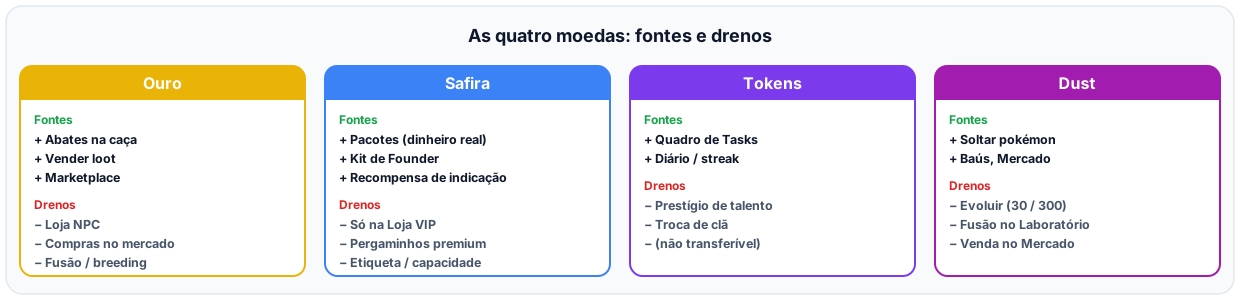
The game has four in-game currencies, each with a defined role: gold is the economy, Safira is the premium currency, token is your build, Dust is your Box.
| Currency | Transferable? | Where it comes from | Where it goes |
|---|---|---|---|
| Gold | Yes (player market) | Hunt kills, NPC sell, market sell, chest sold, junk conversion | NPC shop (balls/potions/revives), gold upgrades, market fees, market buys |
| Safira (VIP) | Yes (market, any amount you want) | Real-money purchase / admin grant, Founders kit, market buy | VIP Shop only (premium scrolls, Name Tag, capacity upgrades) |
| Tokens | No | Completing Tasks | Talent-tree "prestige" nodes, clan switch |
| Dust | Yes (player market) | Releasing pokémon from the Box, chests, market buy | Evolving, Laboratory fusion |
Real money (BRL) sits outside the game: it only buys Safira packages.
Gold in practice
Gold per kill scales with the real difficulty of what you kill: the stronger the monster, the more gold it pays, on a smooth curve with no explosive payouts on the hardest monsters.
On top of that, the region pays a difficulty premium: the gold from every kill is multiplied by the region's level divided by 40. A level 80 region pays double what a level 40 one does, and a level 20 region pays less. The premium has a floor of 0.7 (starter regions never pay less than that). From level 80 up it keeps rising, but at half the pace, up to a cap of 2.3, reached at a level 104 region. Hunting at your level or above is where gold really pays.
On maps above level 40, the gold from each kill gets a little smaller: it drops gradually to 12.5% less at map 65, and stays there from then on. Up to map 40, every map uses the same rate. Because the cut is gradual, a higher map still pays more gold per kill than a lower one.
Safira and real money
Safira is the premium (blue) currency. It enters through real-money purchase (packages with growing bonus), through the Founders kit, or via the player market, in any amount you want. It is only spent in the VIP Shop. See Safira & VIP Shop for prices and packages.
Tokens
Tokens come only from completed Tasks and can never be transferred between players: no trade path exists between accounts. They fuel your build (talent-tree prestige nodes and clan switching).
Dust
Dust is the Box currency, and the main source is releasing pokémon. Every release pays by the pokémon's rarity, from 1 for Common up to 3,000 for Divine (shiny pays nothing). It pays for evolutions (30 for a second form, 300 for a third) and for pokémon fusion in the Laboratory.
Dust is an item in your bag, so it also shows up in chests (about 6 in every 100, from 15 to 600 depending on the chest rarity) and is bought and sold between players on the market. The Shop vendor does not buy Dust. The full table of what each rarity pays and what each fusion costs is in Releasing pokémon and Dust.
Sellable, tradeable, soulbound
Not every item can be sold to the NPC or traded with other players:
- NPC-sellable: almost everything, at a low price (the NPC always pays less than the market).
- Market-tradeable: only curated catalog items; the
special(VIP) category is always rejected. - Soulbound: items flagged as non-transferable. Today no ordinary item is soulbound, but Founder companions are.
Exact buy/sell prices are in the items catalog; market mechanics are in Marketplace.
Discarding an item
An item that does not sell at the shop and is not worth listing can be thrown away. Open the item and use Discard…: choose how many (it starts at 1, with an all shortcut) and confirm. Discarding gives no gold and no Dust, and cannot be undone. It comes out of the backpack first, then the depot. A locked item cannot be discarded: unlock it first.
🔒 Locking an item
Besides deciding whether an item is sellable or tradeable, you can lock any item you already hold in your bag, to make sure it never leaves your account by mistake.
The quick way: double-click the item (on desktop) or press and hold it (on mobile). The long way also works: open the item's details and click the lock icon. A locked item:
- Cannot be sold at the Shop.
- Cannot be listed on the market.
- Cannot fill another player's buy order.
- Cannot enter a trade with another player.
- Cannot be used.
- Cannot be fused at the Laboratory.
- Stays in your bag when the depot organizes on its own: Deposit, Deposit all, Sort depot and the auto organizer all skip it. Moving it by hand is still free.
Locking and unlocking are instant, with no confirmation, and cost nothing. To find everything you have locked, use the Locked chip in the bag's filter bar. The lock only stops the item from leaving your account: you can still hold and count it normally.
Next steps
- Held, gems & healing: exact bonuses for held items, gems, and healing items.
- Chests & loot boxes: how loot is rolled and what each chest rarity can yield.
- Items catalog: the exhaustive, item-by-item list.